AIRPORT
UX Research · Smart Environment · UI Design

SNA
Smart
Check-in

A smart self-check-in system for John Wayne Airport that integrates automatic troubleshooting and baggage transport — eliminating the frustration of kiosk errors forcing passengers back into counter lines.

Type Academic Project
Year Winter 2026
Role Solo Researcher & Designer
Read Case Study
B14 SNA SEA FROM TO PASSENGER SEAT 22A

Context
& the
Problem

01 Field Study
02 Interviews
03 Empathy Maps
04 Journey Map
05 Prototyping

This project builds on research conducted in the fall term studying how space and technology design affect passenger experience at John Wayne Airport (SNA) in Irvine. I focused on how passengers move through the airport and where friction points emerge in the process.

I discovered that passengers frequently encounter frozen screens or are sent back to staffed counters due to baggage drop requirements — revealing a clear gap in system reliability and real-time support.

Problem Statement

How might we help passengers at John Wayne Airport who experience stress when kiosk errors occur and baggage rules force them to stop their progress and wait in counter lines again?

Design Focus

Create a smart self-check-in area at John Wayne Airport that combines automatic assistance and baggage care to provide a smooth, stress-free trip for passengers at the terminal.


Field
Study &
Research

"He tapped again, shifting his weight from left foot to right, uncertain what to do next. Finally, he gave up and rejoined the counter line."

— Field Observation Notes, John Wayne Airport
🗺️
Environment Analysis

The check-in zone is the terminal's first touchpoint — shared by travelers, airline staff, and airport agents. High time pressure and the rigid digital logic of kiosk interfaces together define the experience.

📱
Key Finding: Check-in Interruption

Passengers choose self-service to save time, yet baggage-drop requirements or kiosk errors force many back to counter lines — breaking their expected fast, seamless flow and significantly amplifying frustration.

👁️
Physical Space Observations

Signage is not visible from elevator exits. Limited seating in the lobby. Self-check-in kiosks allow boarding pass printing but checked baggage must still be processed at the staffed counter — a fundamental friction point.

🤝
Interview Insight: Operator Perspective

Airport staff face intense support pressure during peak hours — often learning of kiosk failures only after they occur. Manually resetting hardware and redirecting passengers consumes time that automated systems could reclaim.


User
Empathy Maps

By mapping two distinct user types, I developed a nuanced understanding of the mental models, emotional states, and unmet needs driving each side of the check-in experience.

Passenger
Is the kiosk actually faster? Why is the screen frozen? Will I make my flight?
Frustrated Hesitant Rushed Anxious
Frozen / unresponsive screen Forced to re-queue at counter Unclear baggage drop process Time pressure before boarding
Fast self check-in Clear step-by-step feedback Bag drop handled smoothly Quick recovery without re-queuing
Operator (Airport Staff)
What happened to the system? Why isn't this working? That traveler looks confused
Tired Restricted Under pressure
Delayed awareness of kiosk failures Fragmented baggage workflow Crowding around broken kiosks High support pressure during peak hours
Real-time kiosk status visibility Fewer counter re-queues Remote issue resolution Lower frontline workload

Passenger
Journey Map

The journey map traces passenger thoughts, emotions, and touchpoints from arrival through boarding — identifying the emotional low points and the design opportunities hidden within them.

Arrival
Thoughts
"Where is check-in? I need to find the kiosk."
Emotion
Neutral · Slightly rushed
Opportunity
Improve navigation & signage clarity
Self Check-in
Thoughts
"This should be quick. Just scan my passport."
Emotion
Confident · Expectant
Opportunity
Integrate bag drop with kiosk
System Error
Thoughts
"Why is the screen frozen? Did I do something wrong?"
Emotion
Confused · Annoyed
Opportunity
Real-time error alerts · Auto-restart
Seeking Help
Thoughts
"Is there anyone who can help? I need assistance."
Emotion
Frustrated · Anxious
Opportunity
Add help button · Enable staff alerts
Manual Check-in
Thoughts
"I hope I don't miss my flight. This line is long."
Emotion
Stressed · Impatient
Opportunity
Auto-transfer data · Fast-track line
Boarding
Thoughts
"Finally it's done. Now I can relax."
Emotion
Relieved · Relaxed
Opportunity
Reduce waiting · Improve passenger flow

Smart
Environment
Design

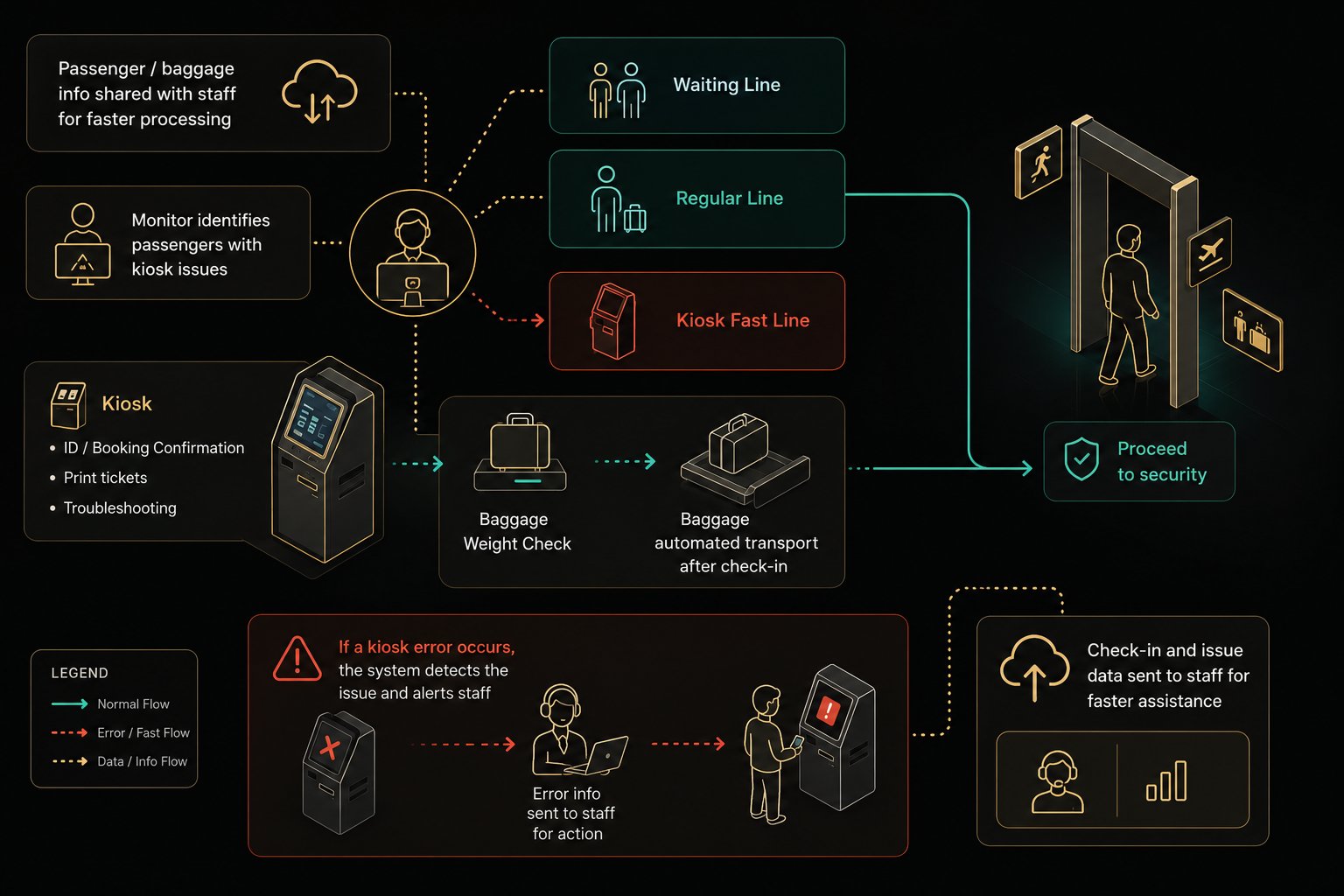
The smart check-in system creates a seamless link between physical space and digital interface. Passenger and operator data flows in real time, kiosk failures are automatically detected and reported, and baggage is transported by AGV cart to the drop zone — closing the loop on the entire check-in process.

When a kiosk error occurs, the system automatically detects the issue and alerts staff — simultaneously uploading the passenger's check-in data to the fast-track counter, so no re-queuing is needed.

Baggage Automated Transport
Kiosk Weight AGV Cart Drop Drop Zone
Smart Environment Visualization

High-Fidelity
UI Screens

Informed by the journey map and empathy maps, I designed six core UI screens covering the complete check-in flow — from identity entry through service selection, printing, success, and two error-recovery states.

22 February, 2026 11:26am Welcome to SNA Please scan your ID or enter your ticket number ID / Enter Ticket 0 1 2 3 4 5 6 7 8 9 # * - @ A Return Done
Screen 01
Welcome / Login
Supports QR scan or manual ticket entry. Date/time and language selector shown in the top bar.
Input
22 February, 2026 11:26am Hi Carson Please select a service Boarding Pass Baggage Ticket Print Cancel
Screen 02
Select Service
Passenger selects boarding pass and/or baggage tag. System pre-fills verified info automatically.
Selection
22 February, 2026 11:26am Please Wait... Passenger Information Baggage Check Printing
Screen 03
Printing / Wait
Live progress bar and checked steps reduce uncertainty during the printing wait.
Processing
22 February, 2026 11:26am Success Please collect your boarding pass and baggage tag Follow the instruction and put it on the bag Exit to Security
Screen 04
Success
Clear completion state guides passengers to collect documents and proceed to security.
Success
22 February, 2026 11:26am ! Error Detected Troubleshooting... !
Screen 05
Error Detected
System auto-detects the error and attempts a restart before escalating to staff.
Auto-fixing
22 February, 2026 11:26am ! Error Detected Kiosk #2 — Status: missing printing paper Uploading Information Please head to fast line to check-in
Screen 06
Upload & Fast-track
When auto-fix fails, data is uploaded to staff and the passenger is routed to fast-track — no re-queuing.
Escalating

Key
Takeaways

01
The power of field observation

Watching a passenger tap the screen before giving up and re-queuing made the problem viscerally real. Field notes surface details surveys never capture.

02
Both sides of the system matter

Mapping both users revealed a two-sided failure. Good system design must serve passengers and operators simultaneously.

03
Errors should never be dead ends

The most important decision was treating errors as transitions, not dead ends — auto-recovery, data handoff, and clear re-routing.